

What is Kanban
Kanban is a dynamic Agile management approach rooted to the principle of continuous enhancement, facilitating the seamless progression of work items from a product backlog into. This method harnesses the power of Kanban boards, which serve as visual aids in project management. Within these boards, tasks are visualized as cards and progress through various stages of completion, delineated by columns. This visual representation grants teams real-time insight into the status of their work.
Kanban is particularly favored among product managers, engineers, and software development teams. Kanban’s versatility in nature can extend to any group striving for enhanced organization and workflow efficiency.
Kanban Board
A Kanban board serves as a visual depiction of your workflow processes, featuring straightforward status indicators arranged across columns. It’s the cornerstone tool of the Kanban method, an Agile approach emphasizing team communication, continuous improvement, and transparency.
Within a Kanban board, you establish standardized task queues such as To-Do, In Progress, and Done to align with your workflow requirements.
Here’s a brief breakdown of the fundamental Kanban board structure
Mainboard: Provides a comprehensive view and management of the entire project.
Columns: Organized lists of tasks corresponding to specific workflow steps.
Cards: Task representations that can be moved through various project stages via drag-and-drop functionality.
Work-in-progress limits: Imposes constraints on the number of tasks permissible within different stages to optimize workflow efficiency.
Kanban swimlanes: Horizontal divisions facilitating differentiation between activities, teams, or services.
The beauty of Kanban boards lies in their accessibility; no formal Kanban certification is required, making them a favorite among Agile teams. Furthermore, project managers appreciate their user-friendly nature, as minimal employee training is necessary for effective utilization.
- Software Project Management
- Issue Tracker
- Human Resource → Employee On-Boarding
- Team Recruitment Board
- Marketing Campaign Management
- Educational Template for Tutors
- Educational Template for Students
- Financial and Accounting
- Construction Project Template
- Creative and media Design
- Pharmaceuticals
- Team Management
- Real Estate Property Management
- Holiday Planner
- Sales CRM
- Support and Ticket Management
- Business and Inventory Management
- Manufacturing Work Management
- Personal Work Management
- Post Sale
Software Project Management
Kanban boards offer unparalleled flexibility for industries like SaaS, manufacturers, and software developers, allowing teams to streamline their processes with ease. Consider this example of a product management Kanban board with KiteSuite:
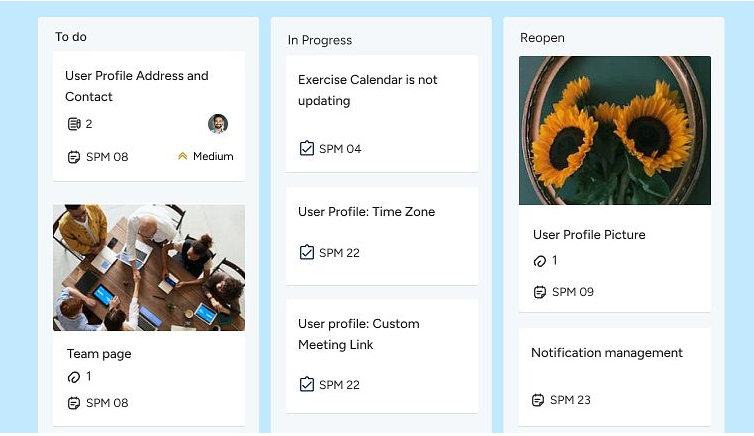
Here are some common stages you can incorporate into different product development Kanban boards:
For software development
- Design
- Development
- Code review
- Testing/quality assurance
- Deployment
In manufacturing and Construction
- Ordered
- Scheduled
- Manufacturing
- Inspection
- Shipping
- Delivered
In SaaS Product Development
- Backlog
- Work in progress
- In review
- Done
- Product management Kanban boards serve as invaluable tools for tracking essential elements throughout the product development journey.
- For instance, if a stakeholder requires an update on a product’s status, the software development team can swiftly reference the Kanban board and provide real-time information.
- Optimize your product backlog management with KiteSuite, the premier product management software for 2024. With features like Sprints, Sprint Automations, and Dashboards, you can seamlessly navigate any user story.
Issue Tracker
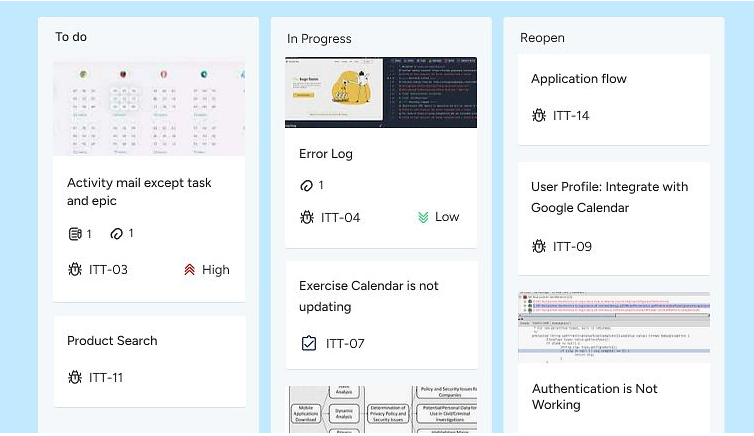
As we know Kanban boards are most famous for their effectiveness in tracking progress, and KiteSuite’ Kanban view takes it a step further by offering custom task statuses. This feature empowers you to tailor your Kanban workflow to match your project’s unique requirements, enhancing your ability to track issues and monitor progress precisely.
Nevertheless, with the option to sort cards by Statuses, you can effortlessly maintain visibility over your project’s advancement, ensuring nothing falls through the cracks.
While Kanban boards excel at progress tracking, they don’t directly handle time tracking. On the brightside with KiteSuite’s Native Time Tracker you can seamlessly integrate with your Kanban board, to easily monitor time spent on tasks without disrupting your workflow.
As the saying goes, trying to do everything often leads to accomplishing less. With KiteSuite’s intuitive tools, you can focus on what matters most while efficiently managing your projects with confidence.
Human Resource → Team Recruitment

Investing in top-notch Kanban software apps for your HR department can transform it from being perceived as the fire department to a well-oiled machine. Here’s why:
With an HR Kanban board, recruiters gain the ability to efficiently hire and retain top-tier candidates while maintaining their own sanity. The enhanced efficiency not only benefits the HR team but also leads to a more favorable candidate experience.
With detailed phases like those depicted, recruiters can effortlessly track each candidate’s status, manage interview schedules, and monitor key HR performance indicators.
Tips: Elevate your HR processes to the next level with HR project management software like KiteSuite. From customizable Hiring Candidates Templates to streamlined application tracking via the Form view, KiteSuite offers all the tools you need in one comprehensive solution!
With a Kanban board, your sales team can automate processes and guide customers seamlessly through the entire pipeline—from initial contact to final purchase and onboarding. This ensures a smooth and efficient journey for both your team and your customers.
Human Resource → On Boarding
With the KiteSuite employee onboarding Kanban board, HR teams can efficiently guide new hires through each step of the onboarding journey, ensuring nothing falls through the cracks and that the process remains organized and transparent. This not only enhances the experience for new employees but also boosts retention rates and overall employee satisfaction.
Take a look at this example of an Employee Onboarding Kanban board:
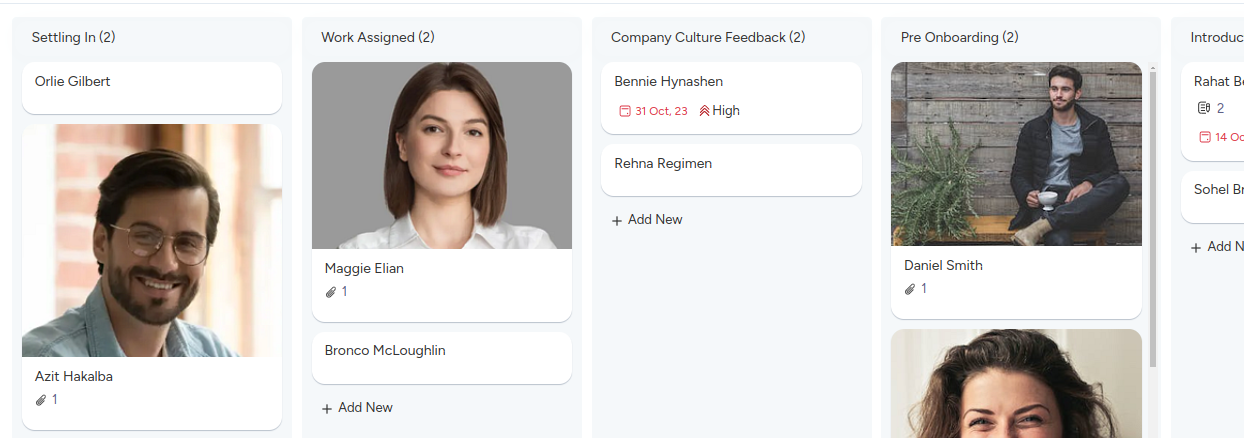
With detailed stages such as those shown, HR professionals can effortlessly track the progress of each new hire, manage tasks related to paperwork, training, and orientation, and monitor key onboarding metrics.
Tips: Streamline your employee onboarding processes with dedicated HR project management software like KiteSuite. With features like customizable Onboarding Templates and intuitive task tracking, KiteSuite simplifies the onboarding process for HR teams and new hires alike!
Furthermore, by leveraging a Kanban board, your HR team can automate repetitive tasks, set reminders for important deadlines, and ensure that every new employee receives the attention and support they need to thrive from day one. This proactive approach not only saves time and resources but also sets the stage for long-term success within your organization.
Marketing Campaign Management
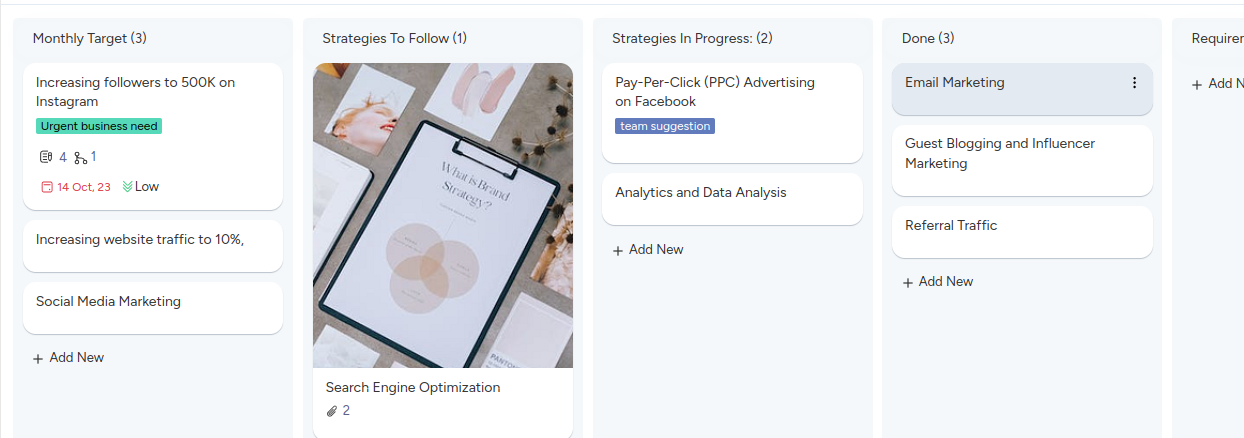
For marketing teams, staying on top of marketing activities, managing budget, and client integration/response is crucial for success. However, without an effective way to track progress, it’s challenging to gauge whether your team is meeting objectives or falling behind.
With KiteSuite enter the Kanban board—a versatile tool that empowers marketing teams to manage various activities, from website design to SEO, with ease.
Your marketing Kanban board can feature stages tailored to your team’s workflow, such as
- Monthly Target
- List out strategies to follow
- List out strategies In Progress
- Target achieved
- Final
Utilizing Kanban swimlanes allows teams to differentiate between different marketing activities, such as “marketing metrics” and “weekly newsletter,” streamlining workflow management and improving clarity.
With a well-structured Kanban board tailored to your marketing team’s needs, you can effectively track progress, maintain transparency, and drive campaigns forward with confidence.
Educational Template for Tutors
In educational institutions, safeguarding both Tutors and student information is paramount, yet it poses significant challenges.
External and internal threats alike can lead to data breaches within educational organizations. For instance, a student downloading a free textbook from but you can noot track or see progress.
Fortunately, your IT department can leverage Kanban boards to visualize security incidents, ensure compliance with regulatory requirements, and efficiently manage backlogs and updates.
Consider this example of an education admin Kanban board:
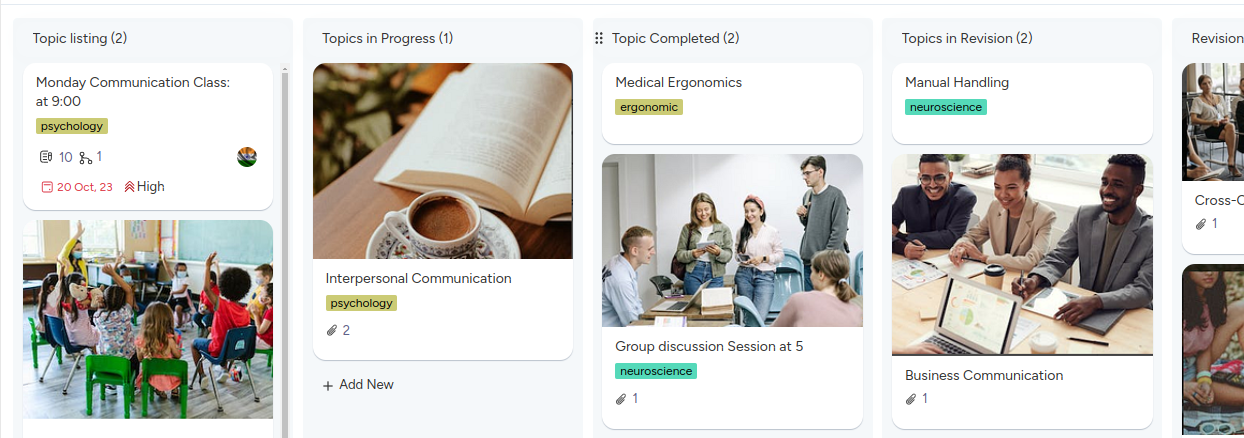
Tips: Simplify IT division management with secure education project management software like KiteSuite. With features such as Two-Factor Authentication and comprehensive task tracking, KiteSuite empowers your IT team to safeguard sensitive information and uphold data security standards effectively.
Educational Template for Students
Creating a Kanban board using Excel or Google Sheets is a smart way for students to organize their projects, collaborate effectively on group assignments, and stay on top of schedules and tasks.
Here are some suggested columns you can incorporate into your student Kanban board
- Topic to Study
- Topics in Progress
- All topics done
- Topics In Revision
- Revision Done
You may create multiple boards with subject names to manage your study plan effectively as it is key to staying organized and focused. For instance, if your assignment is to read William Shakespeare’s play, Hamlet, instead of listing “read the entire play” under the “To-Study” column, you may further break it down or create subtasks under the same topic.
This approach helps prevent overwhelm and ensures steady progress toward your goals.
Furthermore, for group projects, students can divide tasks and assign them to specific team members using KiteSuite Multiple Assignees feature. This enables students to monitor each other’s progress, collaborate efficiently, and ensure timely completion of the group assignment.
Here’s a basic Kanban board template tailored for students:
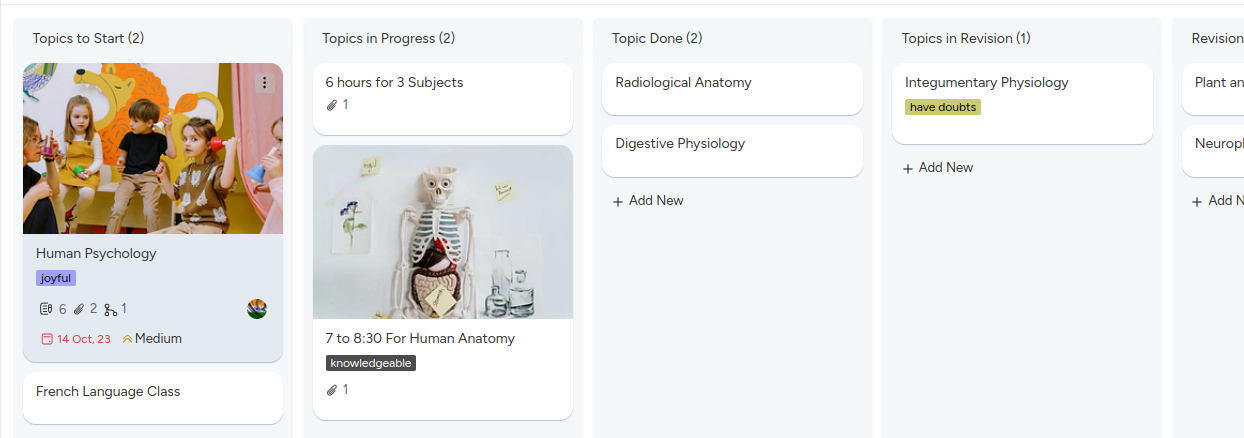
With this customizable template, students can effectively manage their tasks, stay organized, and achieve academic success with ease.
Construction Project Template
A construction Kanban board serves as a valuable tool for both small and large-scale organizations, aiding in the scheduling and management of construction projects efficiently.
Here are some typical phases of a construction project that can be managed using a Kanban board:
- Planning
- Initiation
- Bidding and procurement
- Construction
- Close-out
By utilizing a Kanban board, each construction phase can be further broken down into smaller, more manageable tasks. For instance, the construction phase can be divided into
- Demolition
- Framing structure
- Pour concrete
These detailed Kanban card examples enable agile construction teams to visualize project stages, identify resource shortages, and detect potential issues before they escalate into significant problems or structural failures.
Here’s a basic example of a Kanban board tailored for construction teams:
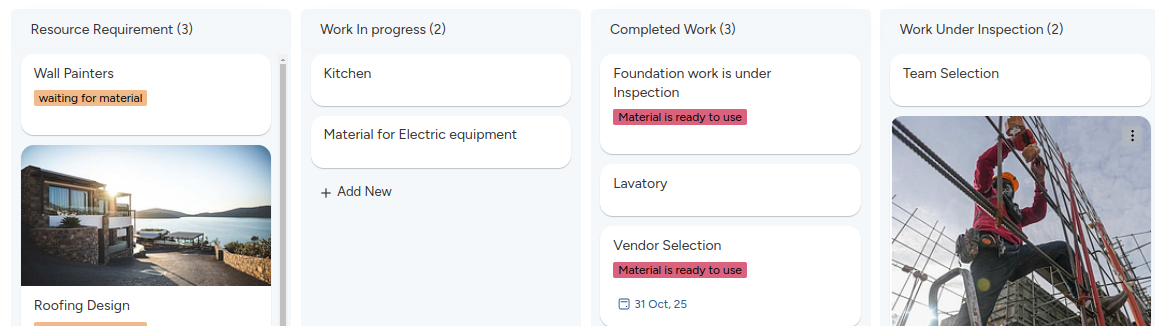
Constructive tip: Enhance your construction project management process with KiteSuite, the ideal construction project management software. With KiteSuite, you can streamline project management tasks and achieve consistent success. Need immediate results? Utilize our professional, pre-built KiteSuite Construction Templates for seamless project execution.
Creative and Media Design
Kanban boards are invaluable tools for creative teams, enabling them to effectively manage ideas, schedules, client feedback, and more. Here’s how different media management Kanban boards can be structured:
Project planning
- Requested
- In progress
- Copy approval
- Design
- Implementation
- Promotion
Photoshoot
- Concept
- Planning
- Scheduled
- Editing
- Delivered
Content and social calendar Kanban boards
- Ideas
- Scheduled this week
- Scheduled next week
- Later this month
- Published
Here’s an example of a media production Kanban board:
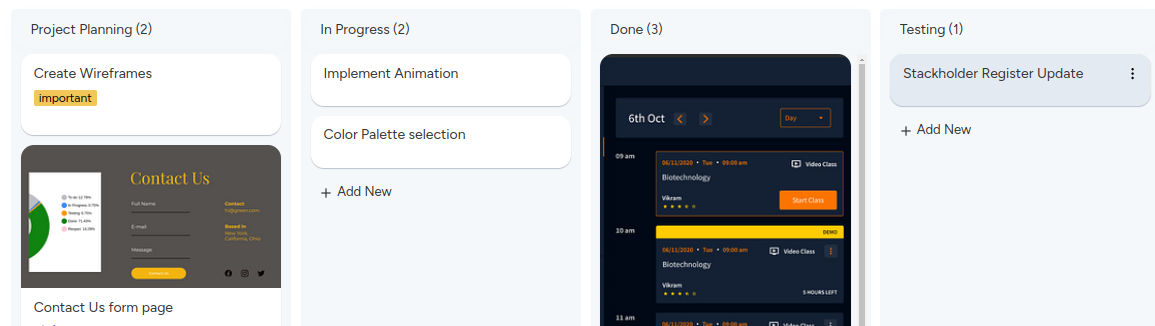
The KiteSuite Video Production Kanban Board Template is designed to streamline your media shoot process, from pre-production to post-production and everything in between. With this template, you can effectively plan, manage, and produce your videos, ensuring a seamless workflow and high-quality output.
Financial and Accounting
Financial and accounting teams can also benefit from using Kanban boards to streamline their processes and manage tasks efficiently. Here’s how you can structure Kanban boards for financial and accounting purposes:
Budgeting and Financial Planning
- Budget proposal
- Review and approval
- Implementation
- Monitoring and adjustments
Accounts Payable
- Invoice received
- Invoice processing
- Payment approval
- Payment processing
- Payment sent
Accounts Receivable
- Invoice issued
- Invoice tracking
- Payment received
- Payment processing
Financial Reporting
- Data collection
- Report creation
- Review and approval
- Distribution
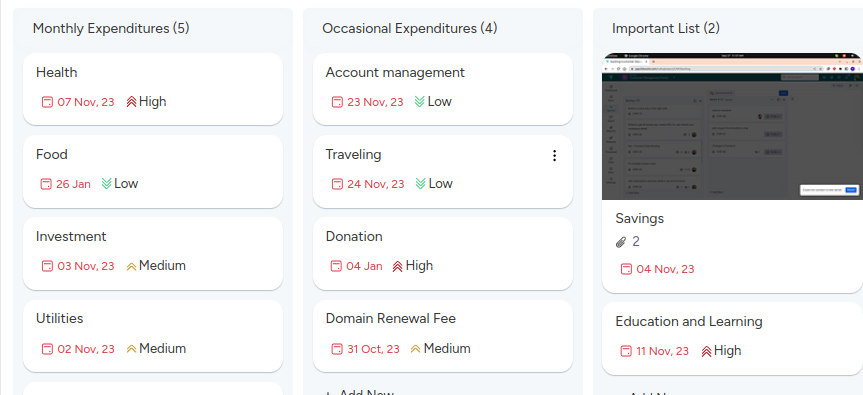
Here’s an example of a financial and accounting Kanban board
Team Management
Team management becomes a breeze with Kanban boards, whether you’re managing Project Management, Recruitment, Finance & Account, Sales or other.
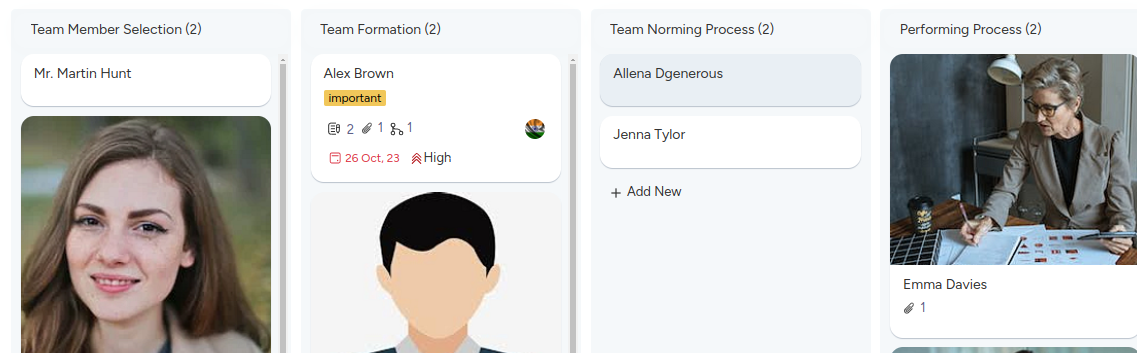
To craft a perfect team management Kanban board, start with standard columns and incorporate images of team members, list out their experiences and skills, and other inspirations to spark creativity. If you’re wanting your team to smoothly pass from Bruce Tuckman’s five stages of development simply add columns such as:
- Forming
- Norming
- Storming
- Performing
- Adjuring
Take a peek at this example of a projectized organization team planning Kanban board
Here’s a fun tip: Elevate your team management with top-notch project management software like KiteSuite. Trust us, it’s a match made in heaven!
Real Estate Property Management
Managing the property selling process can be simplified with the use of Kanban boards, allowing real estate professionals to efficiently track listings, leads, showings, negotiations, and more.
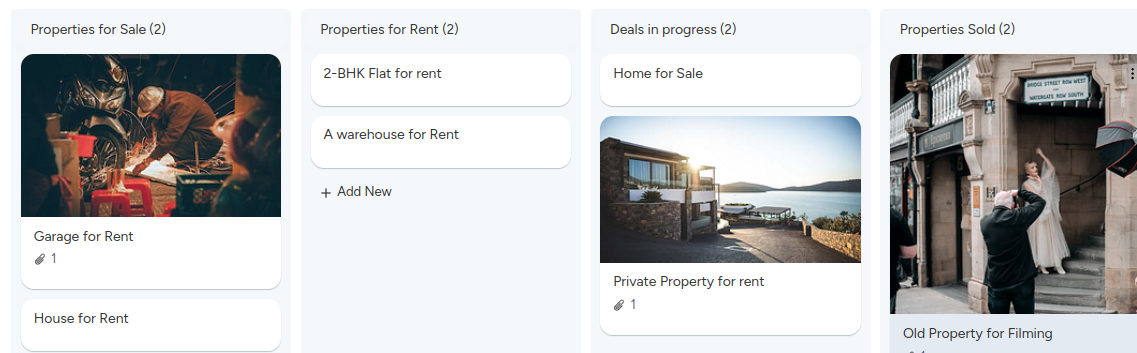
To create an effective property selling Kanban board, begin with standard columns and include relevant information such as property details, listing status, client preferences, and key milestones. You can also incorporate images of properties, client profiles, or neighborhood highlights to enhance visualization and engagement.
If you want to guide your team through the stages of the property selling process, consider adding columns such as
- Property Listing
- Deals in Progress
- Negotiation
- Booking is completed
- Paper work is in progress
- Properties sold
Here’s a glimpse of how a property selling Kanban board might look
Elevate your property listing process with advanced real estate management software like KiteSuite. It’s the perfect tool to streamline your workflow and maximize your selling potential!
Holiday Planner
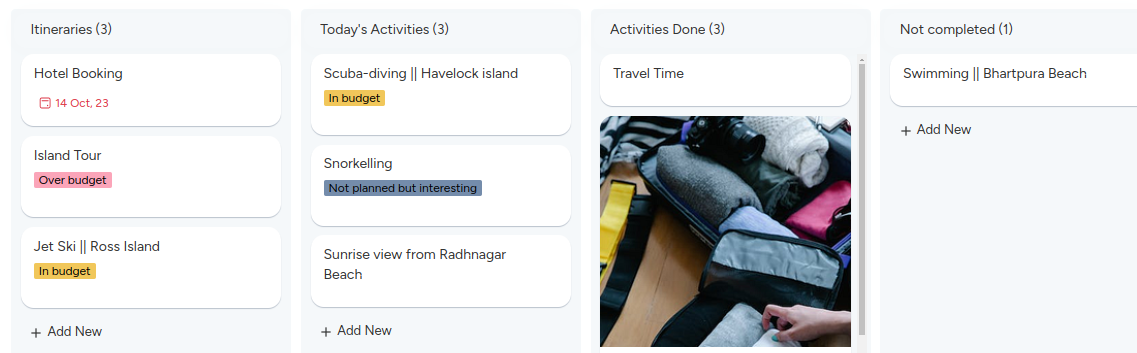
Designing a holiday planner Kanban board can revolutionize your travel organization process. With columns tailored to itineraries, activities for the day, completed activities, and missed activities, you’ll stay on top of your vacation plans with ease.
Here’s how you can structure your holiday planner Kanban board:
Itineraries: This column serves as the starting point for your holiday plans. List out the details of each day’s itinerary, including destinations, reservations, and important timings.
Activities for the Day: In this column, outline the activities you have planned for each day of your vacation. Whether it’s sightseeing, dining at local restaurants, or engaging in adventure sports, jot down everything you intend to do.
Activities Complete: As you complete each activity, move it to this column. It serves as a visual indicator of your progress and allows you to track how much you’ve accomplished during your holiday.
Activities Missed: Unfortunately, not everything goes according to plan during vacations. Use this column to note down any activities that you missed or couldn’t complete for various reasons. It helps you keep track of what you may want to revisit on future trips.
Here’s a visual representation of your holiday planner Kanban board
Pro tip: Enhance your holiday planning experience by incorporating KiteSuite. By leveraging technology and embracing spontaneity, you’ll create a well-rounded and fulfilling holiday experience.
Support and Ticket Management
Support and ticketing teams play a crucial role in retaining customers by swiftly addressing their issues. To ensure seamless resolution, Kanban boards offer invaluable support to your team.
For instance, imagine a customer reports a bug on your e-commerce site. The support team logs the issue on the Kanban board and assigns it to a developer. The developer then analyzes and resolves the issue promptly, moving it to the “Done” column.
Here’s an example of a Kanban board tailored for support teams
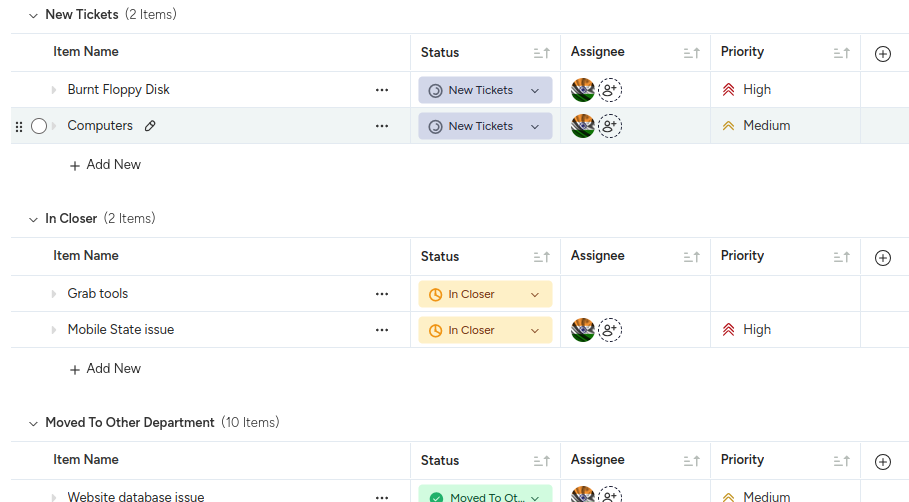
Pro Tips: Enhance your ticketing system’s efficiency with KiteSuite integrations, seamlessly connecting with platforms like Salesforce, Slack, Github and more.
Business and Inventory Management
Kanban boards are invaluable for businesses seeking to streamline their inventory flow.
For instance, the work-in-progress limits in Kanban boards empower teams to maintain optimal stock levels, preventing over-purchasing and warehouse congestion. With Kanban boards, your inventory management team can break free from constraints and operate with agility.
To enhance inventory efficiency further, you can include essential details like cost, location, and delivery dates on Kanban cards.
Here’s a glimpse of how an inventory management Kanban board might look in KiteSuite:
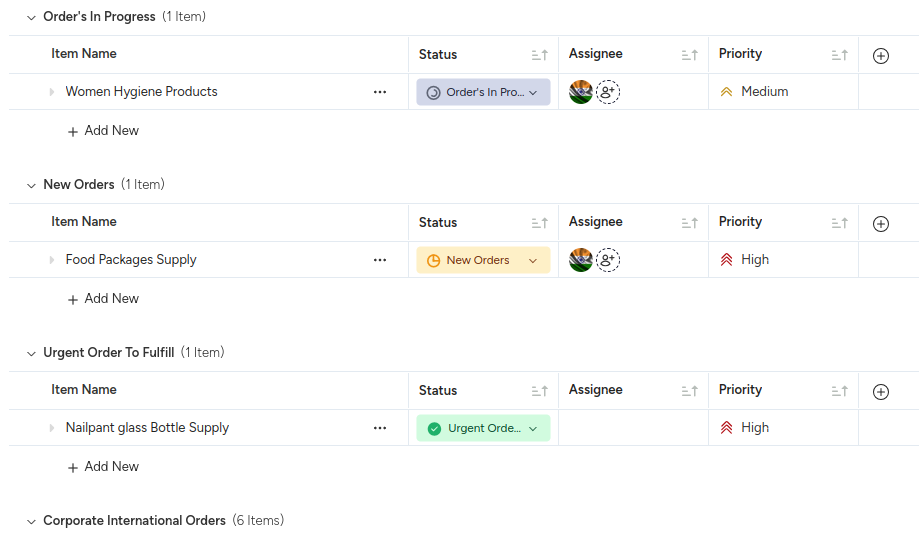
With KiteSuite’s intuitive features, you can optimize your inventory processes and keep your operations running smoothly.
Pro Tips: Elevate your inventory management game with KiteSuite Custom Fields feature. By adding unique statuses like unit cost, order quantity, and upcoming order quantity, dates to your work process, so that you can maintain comprehensive oversight of your inventory at every stage.